NSFW Detector

Avatar
Posts 75 297

NSFW Detector

Not safe for work (NSFW) detector check and scans videos and images to checks and removes explicit images off the form.
Reason it protect minors on the internet to the best of our ability.

Note: This isn't going to be 100% accurate, but it does pretty good. Also note this is ALL Machine Learning algorithm CNN and NLP

Please also, don't go accessing the dataset or in the network of inspect element unless you want to add more data for more efficient scans AND you're a legal adult. This does contain sensitive imagery that may not be good for some user, but this is for training of the AI purpose ONLY. So please don't sue me.

Update log

  • 1.0.0 - Fully Released
  • 1.0.1 - Fix the configuration settings to appropriate input.

How it works

The script will be loaded onto the website which will automatically blur everything out and will create a buffer so it makes it impossible to un-blur the image while it's being scanned and deleted, if the image goes above the threshold, it will be removed from the frontend, but NOT in the backend. It will also blur and remove bad words off the list

What images/Videos does it remove

  • Pornographic imagery
  • Children exploitation/Underage children
  • Inappropriate Weapons (guns, bombs, and etc)
  • Sexual acts and "toys"
  • Sexual assault(SA)/Domestic violence(DV)
  • Nudity

Feature updates

  1. More datasets, but I also want to keep this lightweight.
  2. Other things like bug fixes and/or user requests.
  3. Detect uploaded Videos (Right now I believe Flatboard only supports image uploads and embedded 3rd party videos)

Internet safety laws

Download

Download the project here NSFWDetector - Github

📝 License

Copyright © 2025 Flatboard Team
This project is GPL3 licensed.

Edited on  Jan 05, 2026  By  Gavin .

  • Like(1)
    iorGianiorGian
Avatar
Posts 75 297

Download

Download the project here NSFWDetector - Github

Saving a topic description doesn't work, so here is the download link

Edited on  Dec 22, 2025  By  Gavin .

Avatar
Posts 428 1580

Your resource has been approved and is now available in the resource center. Always useful! :)

Avatar
Posts 75 297

Fred

I saw thank you. I have more ideas coming up.

Avatar
Posts 75 297

@Fred
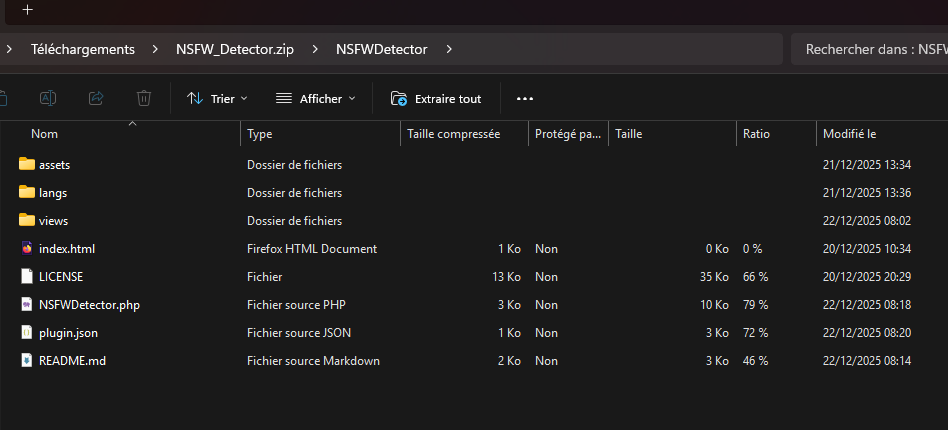
Are you able to fix the download it downloading a zip folder with a folder inside, are you able to modify the ZIP where only the files are inside so I'm not having Plugin_id/PluginName/assets_here just Plugin_name/assets_here

Edited on  Dec 28, 2025  By  Gavin .

Avatar
Posts 428 1580

I don't understand, the archive only contains the plugin name as you can see in the screenshot.

If I understood your request correctly, you want the ZIP archive to not contain an extra folder (like Plugin_id/PluginName/), but only the plugin files in the root folder. To fix this, here’s what you can do:

  1. Extract the ZIP file.
  2. Move the files directly into the root folder (instead of keeping them in a subfolder like Plugin_id/PluginName/).
  3. Recompress the files into a new ZIP archive without the extra folder.
Avatar
Posts 75 297

I don't want the folder in the zip, so once it's unzip it should be a folder inside another fole then then the assets, just folder/assets

I don't want NSFW_Dectector.zip/NSFWDectector/assets just NSFWDectector.zip/assets

Avatar
Posts 428 1580

Why the Current Structure is the Correct Method

The current structure Plugin_id/PluginName/assets_here follows standard conventions for plugin and project archives. Here's why you should keep it this way:

Reasons to Keep the Parent Folder

  1. Clear Identification: The outer Plugin_id folder immediately identifies which plugin was downloaded, especially when downloading multiple plugins.

  2. Prevents Conflicts: Without this parent folder, extracting multiple plugins to the same directory could overwrite files or mix contents from different plugins.

  3. Industry Standards: Most archive managers (GitHub, GitLab, npm, etc.) automatically create a root folder with the project name. This is a universally accepted practice across software development.

  4. Security: This structure prevents accidental extraction of files directly to the root directory, which could cause security issues or system disorganization.

  5. Professional Distribution: All professional software packages follow this pattern - it shows proper packaging practices.

The Standard Workflow

The expected user workflow is:

  1. Download the ZIP file
  2. Extract it once
  3. Navigate into the folder structure
  4. Access the plugin files

This is how software distribution works across the industry.

If You Still Want to Change It

If you absolutely prefer PluginName/assets_here directly, the proper solution is to adjust your extraction process on your end, not modify the archive structure. You could:

  • Extract and manually reorganize
  • Use a script to restructure after download
  • Extract only the inner contents

However, I strongly recommend keeping the current structure as it follows best practices for software distribution and will be familiar to all users.

Avatar
Posts 75 297

Fred

Alright, that's fine.

Avatar
Posts 75 297

Updated 1.0.2

https://github.com/XHiddenProjects/Flatboard/blob/master/Downloads/v5/plugins/NSFWDectector.zip

Visitor, reply to this topic…
Log in to reply
Navigation
10 Posts
post #1
21 Dec 2025
By Utilisateur
Statistics
166
Discussions
911
Replies
21
Flatboarders
4
Contributors
New member : Emmanuel
Online
40 Guests online